CNJ Free Space: a free app to free up iPhone storage
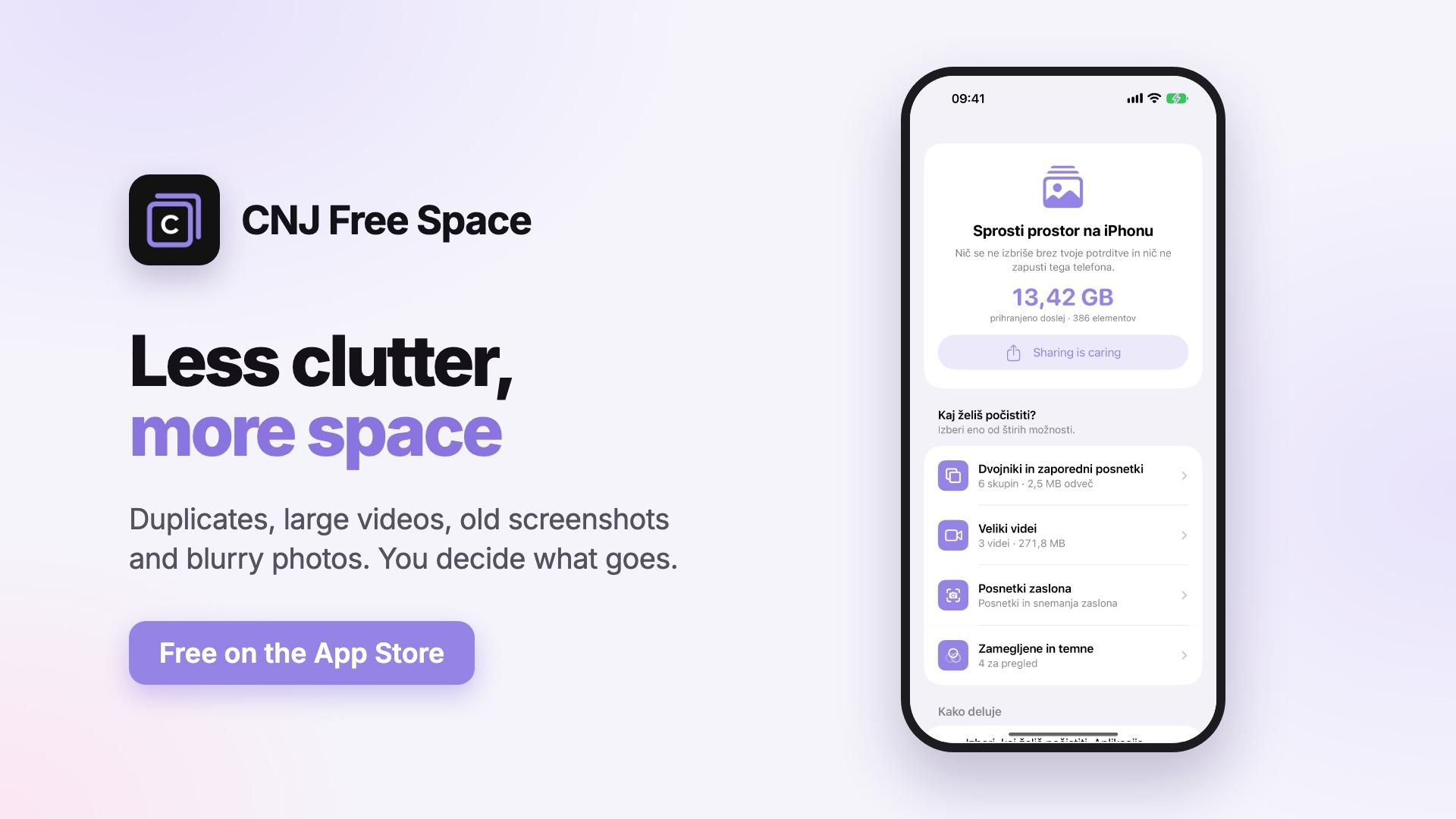
CNJ Free Space is a free iPhone app that finds duplicates, large videos, old screenshots and blurry or dark photos in your Photos library. It shows you what is taking up space and you decide what goes: nothing is deleted without your confirmation and no photo ever leaves your phone. From version 1.1 it also tells you how to free up space in WhatsApp, Spotify and other apps. We built it at CNJ Digital in Ljubljana, Slovenia.
Get the app on the App Store. It runs on iPhone with iOS 18 or later. The app's interface is in Slovenian.
CNJ Free Space in 20 seconds, with on-screen text in Slovenian. Click the video to play it. Music: Sascha Ende, ende.app (CC BY 4.0).
In short
What it finds: duplicates, bursts and similar shots, large videos, old screenshots, and blurry or very dark photos.
How: all four checks start by themselves when you open the app and run only on your phone.
Videos: watch a large video, delete it, or compress it to a smaller copy that replaces the original.
Other apps: a screenshot of iPhone Storage shows which apps take the most space, and the app tells you how to clean up WhatsApp, Spotify and others.
Safety: iOS asks you to confirm every deletion, and deleted items stay in Recently Deleted for 30 days.
Privacy: no account, no ads and no data collection.
→ Get CNJ Free Space free on the App Store
Why your phone fills up with photos
A full iPhone rarely means you have too many good photos. Most of the space goes to things nobody looks at any more: the same picture saved twice from a chat, ten shots of the same moment, a screenshot of last year's payment receipt, and a few long videos that take up more than hundreds of photos.
They are hard to find by hand because they are scattered across years of photos. CNJ Free Space gathers them in four places.
Four checks
Duplicates and bursts: the same photo or video more than once. Only truly identical files are ticked for you, and one copy always stays. In a burst you keep the best frame, and shots taken a few seconds apart are left for you to review.
Large videos: sorted by size, largest first. You can watch each one before you decide.
Screenshots: screenshots and screen recordings sorted by age. The oldest are at the top, because you most likely no longer need them.
Blurry and dark: shots that went wrong, such as pocket photos or a lens cap. The estimate is not always right, so nothing here is ticked for you, and you can open every photo full size.
The checks start running as soon as you open the app, so the results on the home screen are often ready before you choose what to clean up.
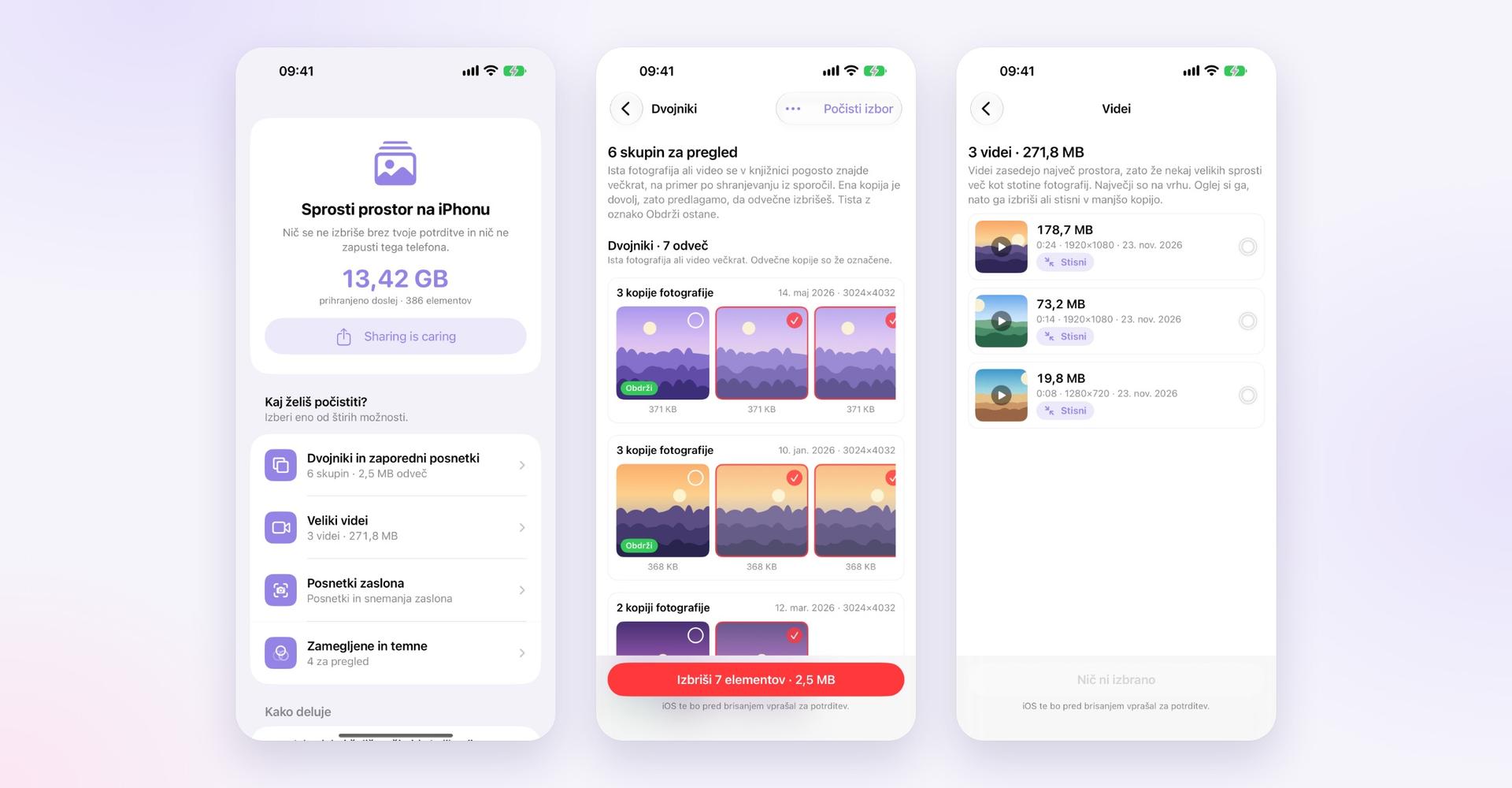
The home screen with the four checks, duplicates marked Keep, and the list of large videos.
Which duplicate stays
When the app finds several copies of the same photo, it marks one Keep and ticks the others. It keeps the one in your favourites, then the one you edited, then the larger file, and finally the older one. You can change the ticks, but the app will not let you tick the last copy.
Compress videos instead of deleting them
Videos are the largest part of most libraries, but often you do not want to delete them. CNJ Free Space can compress a video to HEVC and scale it down to 1080p if it is larger. Before replacing it you see the size and resolution of both the original and the copy. In our test a 73.2 MB video went down to 20.3 MB.
The copy must be the same length, still have sound and be at least 20% smaller, or the app does not offer it.
Date, location and favourite carry over to the copy; album membership does not.
Compression keeps running after you close its window and notifies you when the copy is ready.
Tick several videos at once. They are compressed one after another, and you replace all the originals with one confirmation.
Compression lowers quality, so the original is never replaced on its own. For slow motion, cinematic and edited videos the app first tells you what will be lost.
→ Less clutter today: CNJ Free Space on the App Store
New in version 1.1: space in other apps
Photos are not always what fills the phone. On many iPhones WhatsApp, Viber or Spotify take up the most space. iOS does not let any app look inside other apps, so CNJ Free Space uses a screenshot instead: it reads the list in iPhone Storage, sees which apps take the most space and tells you how to clean up each one.
Open Settings → General → iPhone Storage and wait for the list of apps to load.
Take a screenshot. To cover more apps, scroll down and take another one.
In CNJ Free Space, open Druge aplikacije (Other apps) and pick the screenshots.
The app reads the screenshots on the phone and sorts the apps by size. For apps it knows, it gives concrete steps: in WhatsApp it points you to Manage Storage, where files larger than 5 MB are at the top, in Spotify and Telegram to the button that clears the cache, and in YouTube and Netflix to your downloads. For apps it does not know, it suggests a general route such as Offload App, which removes the app but keeps your data.
You do the deleting yourself in each app, because CNJ Free Space cannot delete anything inside other apps. The first time you open the screen, a short picture guide with screenshots of Settings shows you where to tap.
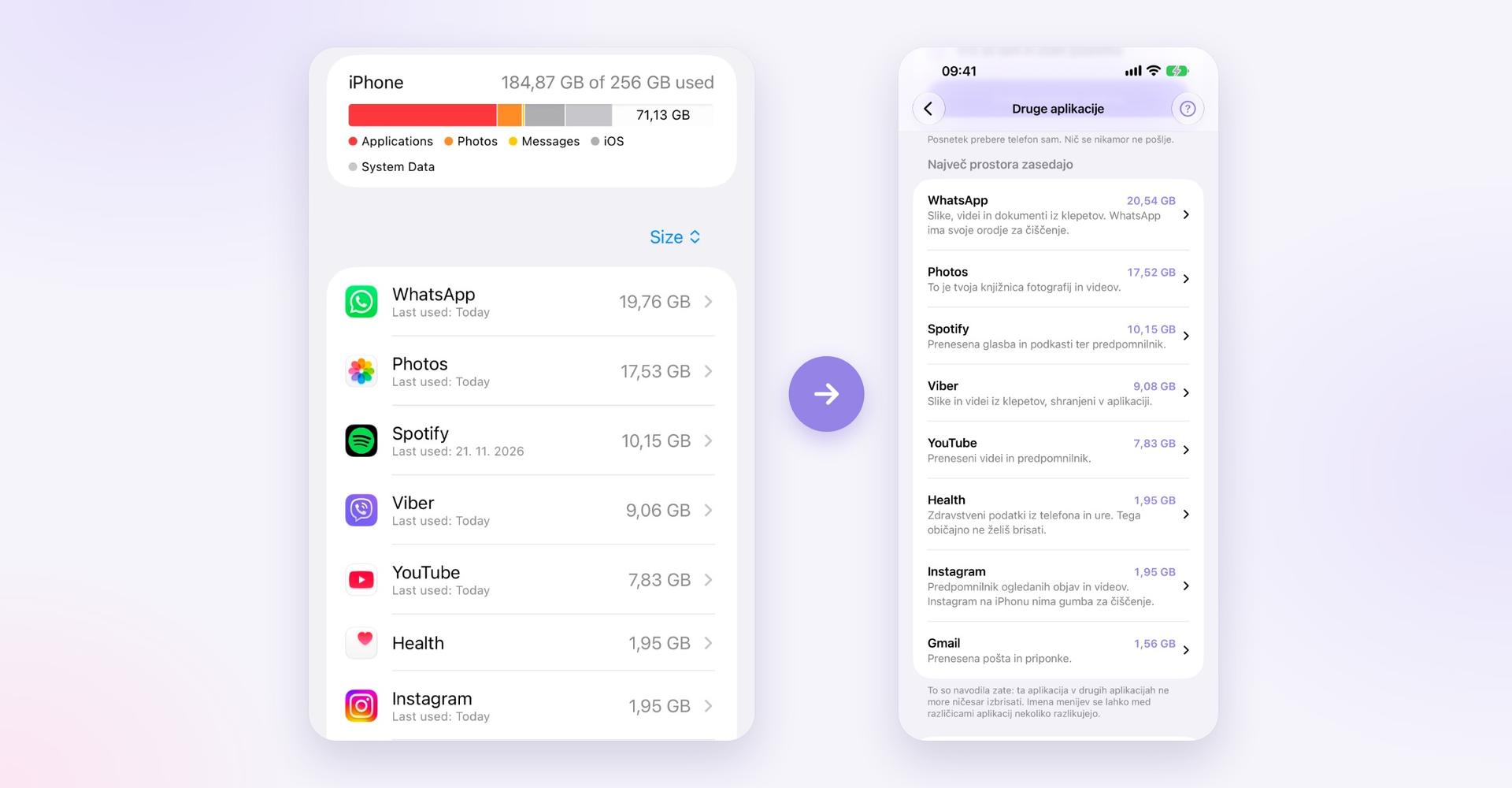
A screenshot of iPhone Storage (left) and the advice CNJ Free Space builds from it (right), in Slovenian.
How much you have saved
At the top of the home screen a counter adds up the size of everything you deleted or compressed. The Sharing is caring button turns it into an image for an Instagram story, in Slovenian or English.
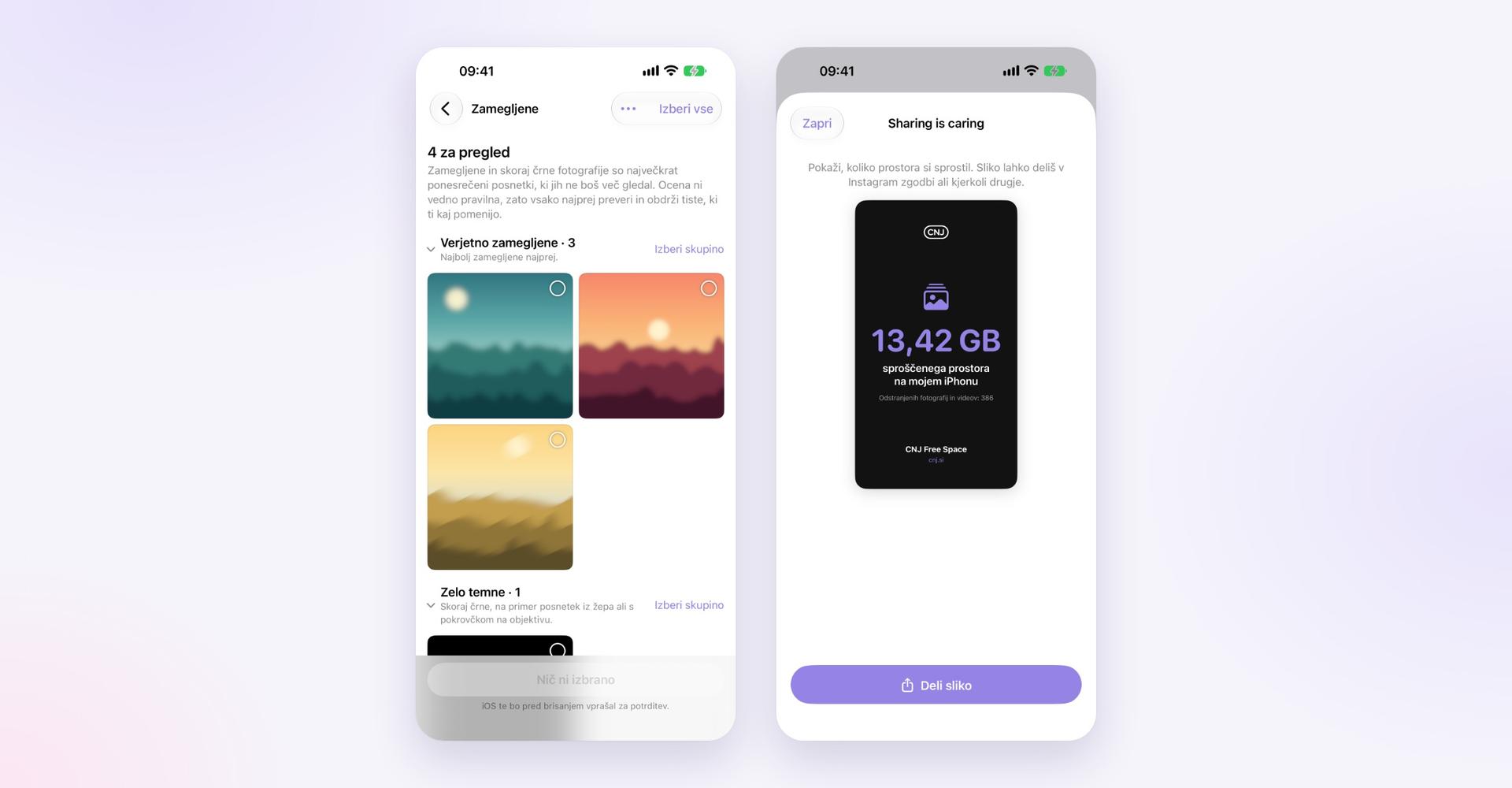
Blurry and dark photos, and the savings image you can share.
What happens to deleted photos
The app never deletes on its own. When you have chosen what goes, iOS shows its own confirmation and only then are the photos deleted.
Deleted photos and videos go to the Recently Deleted album, where they stay for 30 days. The space is freed once you empty that album in Photos. Until then, any mistake can be undone.
If you use iCloud Photos, two more things are good to know:
Deleting removes the item from all your devices.
With Optimise iPhone Storage on, the originals are already in the cloud, so less space is freed on the phone than the app shows.
Privacy
CNJ Free Space collects no data. It needs no account and has no ads or analytics, and your photos are checked on the phone and never leave it. Screenshots of iPhone Storage are read on the phone too. Details are in the privacy policy.
→ CNJ Free Space is free: get it on the App Store
From idea to the App Store in two days
We started building CNJ Free Space on the evening of 22 November 2026 with one question: can an app find duplicates by itself and free up space on the phone? Over the following hours came bursts, large videos with compression, screenshots, blurry photos and the savings counter. We submitted it for review the next day, and it has been on the App Store since 24 November.
After submitting it we set out to break it on purpose: with broken files, 2,500 single-colour images, and deleting a video in the middle of compression. We found seven issues. The most important one was that the app ticked similar but different documents as duplicates, for example two invoices with the same layout. The fixes are in version 1.0.1, on the App Store since 25 November: only truly identical files are now ticked as duplicates.
We used AI coding tools to build it, while the decisions about what the app suggests for deletion and how it handles your photos stayed with us. The same process produced CNJ AdShield, an ad blocker for iPhone, and UPN to SEPA for paying Slovenian bills with Revolut, and we use it for clients in our AI pilot.
Frequently asked questions
Can't the iPhone do this already?
In part. Photos has a Duplicates album under Utilities that merges identical photos. Besides duplicates, CNJ Free Space also finds bursts, large videos it can compress, old screenshots, and blurry or dark photos.
Can the app clean up WhatsApp too?
Not by itself, because iOS does not let apps delete anything in other apps. From a screenshot of iPhone Storage it sees how much space WhatsApp takes and walks you step by step to WhatsApp's own Manage Storage tool.
Does the app delete anything by itself?
No. It suggests and ticks, and you delete. iOS asks you to confirm every deletion.
Why isn't the space freed straight away?
Deleted items go to Recently Deleted and stay there for 30 days. The space is freed once you empty that album in Photos.
Do you send my photos anywhere?
No. The checks run on your phone, the app collects no data and needs no account.
Is the app in English?
The interface is in Slovenian for now. The savings image you can share is available in Slovenian and English.
How much does it cost?
Nothing. CNJ Free Space is free, with no ads and no in-app purchases.
Get CNJ Free Space on the App Store. Have an idea for a similar tool? Get in touch.
We write about it. We also build it.
Let's talk about your project
A 30-minute call to understand what you're building and how cvan we help. No brief required.
Prefer email?
info@cnj.si