A digital photo archive with AI for the public sector and larger companies
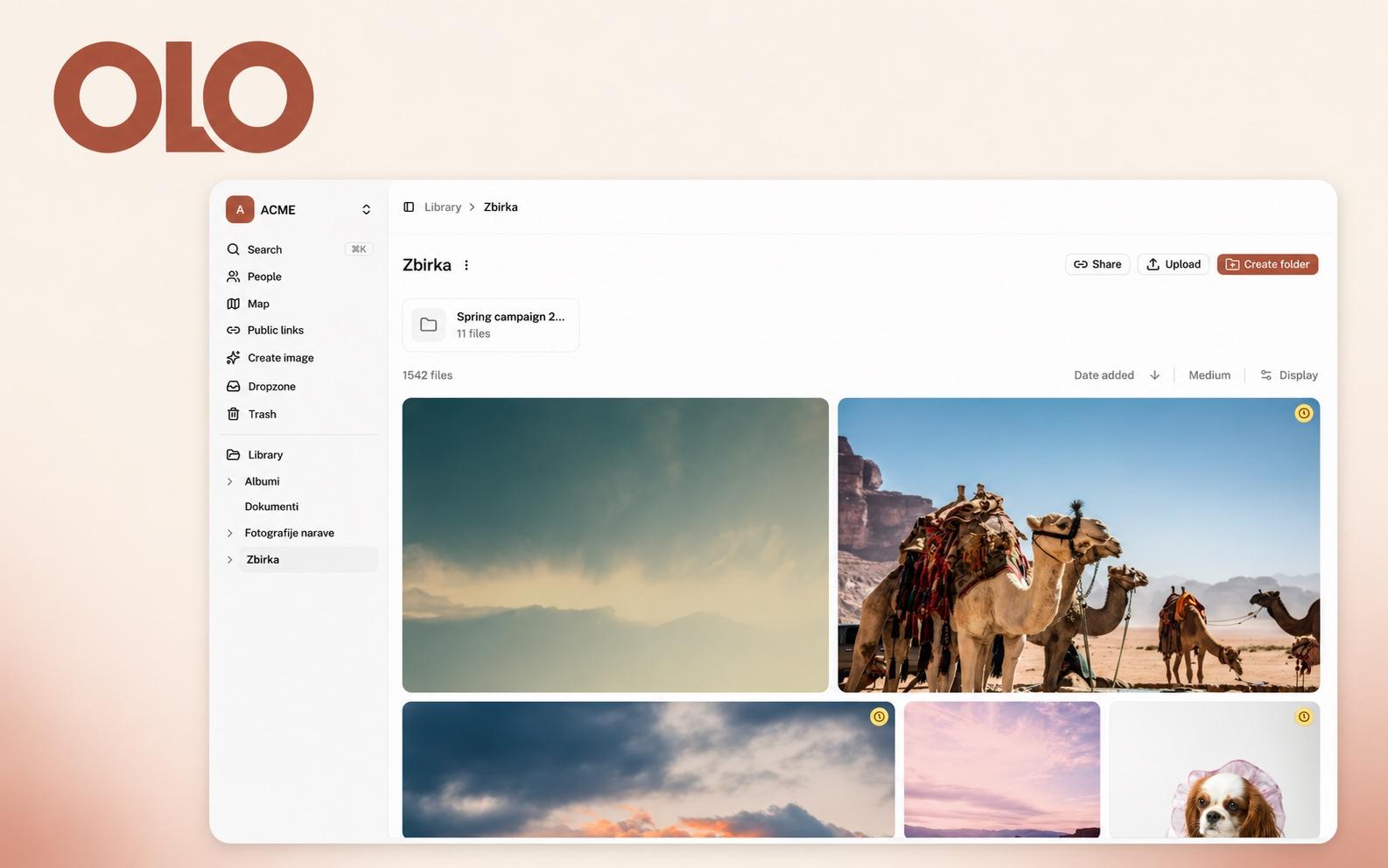
An organisation with tens of thousands of photos has two problems: it cannot find the right one, and it does not know whether it may use it. A digital photo archive with artificial intelligence solves the first by tagging and describing every photo itself. It solves the second by keeping the licence, the expiry date and the access rules next to every file. For the public sector and larger companies a third thing matters: that AI stays under their control.
A disclosure first: OLO is our product. We build it at CNJ Digital for teams whose photos are scattered across drives, email and ZIP files, and who do not know for certain which ones they may still use. This article describes what a digital archive with AI really does, what it leaves to you, and when OLO is not the right choice.
In short
AI organises the image library. Every photo gets tags and a description on upload, and you search in your own words.
AI edits and creates images. You describe a change in words and get a new version. New images are made from a description or from your own photos.
Control stays with you. You can switch the AI features off, files are not used to train models, and you see the cost of AI in advance.
Rights sit next to the file. Licence type, rights owner and expiry date, with a warning before it runs out.
Access is traceable. Roles, permissions by folder and a record of every download.
What a digital archive is and why a shared drive is not enough
A digital archive, or DAM (digital asset management), is a system that stores photos, videos and documents together with the data about them: what is in the picture, who the author is, until when you may use it and who downloaded it. A shared drive stores only files and folder names.
The difference shows in search. According to a 2012 estimate by the McKinsey Global Institute, people who work with information spend about a fifth of their working time looking for information. The figure is old, and the amount of photos and video has only grown since.
In public organisations the problem is bigger, because material builds up over decades while people change. The photo from an event is on a former colleague's drive, the contract with the photographer is in another system, and the consent of the people in the photo is in a drawer.
AI organises the image library for you
The biggest job in any archive is tagging. It is also the job nobody does, which is why an archive stops being usable after two years. In OLO, artificial intelligence does it:
Tags and descriptions. On upload, every photo gets tags for what is in it and a short description in your organisation's language. Descriptions and keywords already stored in the files are kept.
Search in your own words. You type "children on a beach at sunset" and get the photos that show it, even if nobody tagged them. Search works in English and in Slovenian.
Text and speech. Search covers the text in PDF and Office documents. Video and audio recordings can be transcribed, and search opens the recording at the second the word was spoken.
People and places. OLO groups similar faces, so you name a person once. Photos with location data appear on a map.
Duplicates. A file that is already in the library is not stored a second time.
For the public sector the description has one more use. Public sector websites in the EU must be accessible, which includes alternative text for images. A description prepared by AI is a good starting point for it, but a person has to read it before it is published. More on that in our article on digital accessibility.
AI edits a photo when you describe the change
For smaller fixes there is no need to open an image editor or wait for a designer. You open the photo, describe the change, for example a new background or a different season, and choose a model.
Every instruction creates a new version in a strip under the photo. You compare it with the original, keep editing it, save it as a new file or discard it. The original stays unchanged, which is essential for an archive: it is always clear which photo was taken and which was processed.
AI creates a new image from a description or from your photos
When the right photo does not exist, you can create it. You describe the image you need, or add up to 16 of your own photos as a starting point. The new image is saved to the library next to your photos and remembers the instruction, the model and the photos it was made from.
That trail is not a detail. Since 2 August 2026, Article 50 of the EU AI Act requires that content created or changed with AI so that it appears real is labelled as such. A photo of a real place whose season you change with AI may fall into that group. When a label is required is for your legal team to decide. But the archive must be able to answer whether an image was taken or created.
Control over AI: the questions a public buyer asks first
For public organisations and larger companies, this is where it is decided whether a tool is acceptable at all. The answers for OLO:
Can we switch AI off? Yes. Each workspace chooses which features to switch on and can switch them off at any time. The library, search by names and tags, licences and sharing keep working.
Are our files used to train models? No. Files are sent to the AI provider only so that it can prepare the result you asked for.
Where do images go during AI processing? For tags, descriptions and translations OLO uses OpenAI, and for transcripts Groq. Some providers are based outside the European Economic Area, and the transfer relies on standard contractual clauses. If your rules do not allow that, AI stays switched off.
Who may edit and create images? Editors and administrators. An administrator can allow AI only for images where a dedicated field permits it, for example the licence.
What will it cost? Before processing, you see how many files are waiting and what the processing will cost. You track monthly usage, and credit is topped up only up to the limit you set.
Can AI get it wrong? Yes. Tags, descriptions and edits are suggestions, so check them before you rely on them.
Face recognition is the exception: it runs on OLO's own servers, not with an external provider.
Rights and licences: until when you may use a photo
In 2018 the Court of Justice of the EU ruled on a case that too few public organisations know. A pupil at a German school used a photo from a travel website for a presentation, and the school published the presentation on its website. The photographer sued the state of North Rhine-Westphalia. In case C-161/17 the Court held that posting the photo again requires a new authorisation from the author, even though it was freely accessible elsewhere.
The message is clear: "we found it online" is not a licence, and a public institution is no exception.
In practice, problems rarely start with a stolen photo. They start with a photo bought for one campaign, one country or one year, which someone uses again three years later. The terms are in the contract, and the contract is not next to the photo.
In OLO this data sits next to every file:
Licence type, rights owner and expiry date. "Unlimited" is recorded explicitly, so an empty field never means "we do not know".
A warning before expiry. You decide how many days in advance it appears. The badge is visible in the grid, so files do not have to be opened one by one.
A filter. One search lists everything that expires in the next month.
Consent of the people pictured. You can keep consent in a field next to the photo, just like the licence.
An important limit: OLO shows what your team enters. It does not verify licences itself.
Who sees what, and what has left the archive
A larger organisation does not need one big shared space. It needs rules.
Roles. Administrator, Editor, Viewer, Guest and Photographer, or roles of your own. For each folder you decide who may view it and who may edit. New users join by invitation only.
Download history. Every download is recorded: who, when and in which size. This also applies to downloads through public links.
Galleries for media and partners. You send a link with a password and an end date, not a ZIP file. The recipient needs no account, and you decide whether they may download originals, a smaller copy or nothing.
External photographers. They upload to their own private space and send you the material for review. They do not see the rest of the library.
People in photos and the GDPR
A photo in which a person can be recognised is personal data. Face recognition goes a step further: under recital 51 and Article 9 of the GDPR it is processing of biometric data, which usually requires explicit consent.
That is why face recognition in OLO is the administrator's decision. When it is switched off, all detected faces and people are permanently deleted. When it is on, it also helps with erasure requests: you find all photos of one person in minutes.
OLO does not choose the legal basis for you. That is a job for your data protection officer. More in the guide Faces in photo archives and the GDPR.
What else matters for a larger organisation
Data in the EU. Files are stored in the European Union, and the service is run by CNJ d.o.o. from Ljubljana.
Pricing per organisation. There is no price per user. The Team plan includes up to 25 members, and Business has no limit. The price depends on storage, AI usage and custom development.
Data travels with the file. Title, description, alternative text, author and location are written back into the original file. If you ever change systems, you do not lose the descriptions.
Large files and backups. A single file can be up to 200 GB. Originals are copied to separate storage locations, and deleted files stay in the trash for 30 days.
Tailoring. We set up fields, roles and warnings around the way your team works. We build the connection to your system, or the feature that does not exist yet.
When OLO is not the right choice
You have a few hundred photos and one editor. A tidy shared drive will do.
You want a public price list and a card checkout. We prepare an offer after a short call, because it depends on storage and AI usage.
You expect legal judgement from a tool. OLO keeps licences and consents, but whether they are correct and sufficient is your decision.
How to start
On a short call we show you OLO on photos, videos and documents like the ones your team uses. Request a demo at olo.si or write to hello@olo.si.
OLO is one of the products we build with AI at CNJ. If you are thinking about AI in your own product or process, the AI Pilot package is designed as the first step.
Frequently asked questions
What is a digital archive, or DAM?
DAM (digital asset management) is a system that stores photos, videos and documents together with the data about them: descriptions, tags, licences and access rights. It differs from a shared drive in that you find files by their content and see for each one whether you may use it.
Does OLO use our photos to train artificial intelligence?
No. Files are sent to the AI provider only so that it can prepare the result you asked for, and they are not used to train models.
Can we switch the AI features off?
Yes. Each workspace can switch AI processing off at any time. The library, licences, roles and sharing work without it.
Which languages does AI search understand?
You search for photos in your own words in English or Slovenian. OLO also writes descriptions in your organisation's language.
Do we have to label images created with AI?
Since 2 August 2026, Article 50 of the EU AI Act requires a label on content that is created or changed with AI so that it appears real. Whether that applies to a particular image is for your legal team to decide. For every created image OLO keeps the instruction, the model and the source photos.
What does OLO cost?
The price is set for the organisation and does not depend on the number of users. It depends on the plan (Team or Business), storage, AI usage and any custom development.
Where are the files stored?
In the European Union. The service is run by CNJ d.o.o. from Ljubljana in line with the GDPR. For the AI features, processing is done by external providers, which are listed in the privacy policy.
We write about it. We also build it.
Let's talk about your project
A 30-minute call to understand what you're building and how cvan we help. No brief required.
Prefer email?
info@cnj.si